Sale is Live ! Get 10% extra off on Smart School & Smart Hospital use coupon code SAVE10P & 50% extra off on all add-ons use coupon code SAVE50P for more details contact Sales Support.
Cloud ReadySchool ERP · Cloud or Self-Hosted→
Reduce administrative work by 70%
The all-in-one school ERP — admissions, fees, attendance, exams, library, transport, accounts, parents, staff. Choose a one-time license on your own server or a fully managed cloud plan.
11000+ schools, colleges, institutes across the globe.
44 Million+
Students managed
825K+
Staff managed
$856 Million+
Amount transacted
★★★★★
4.7
588
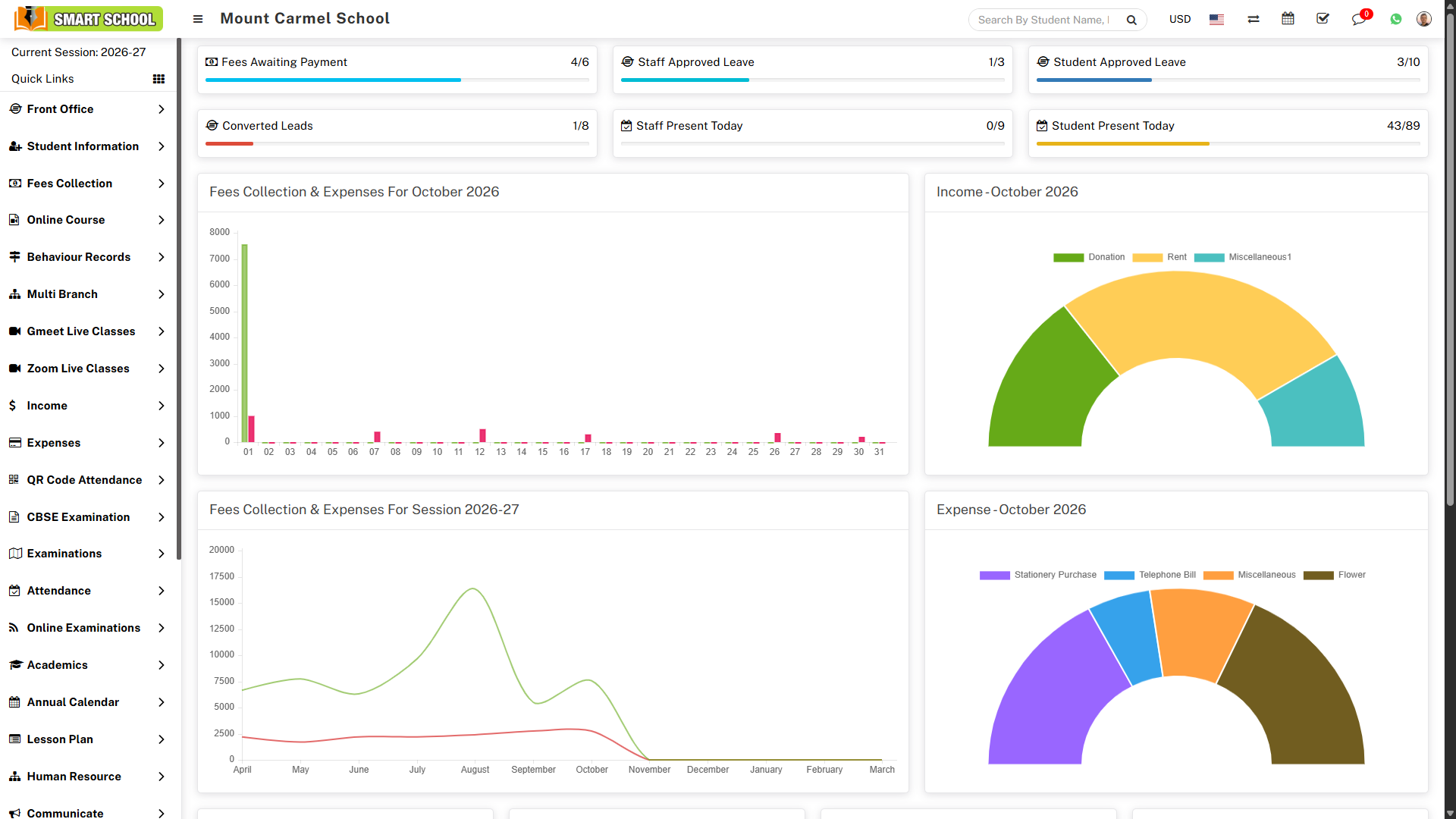
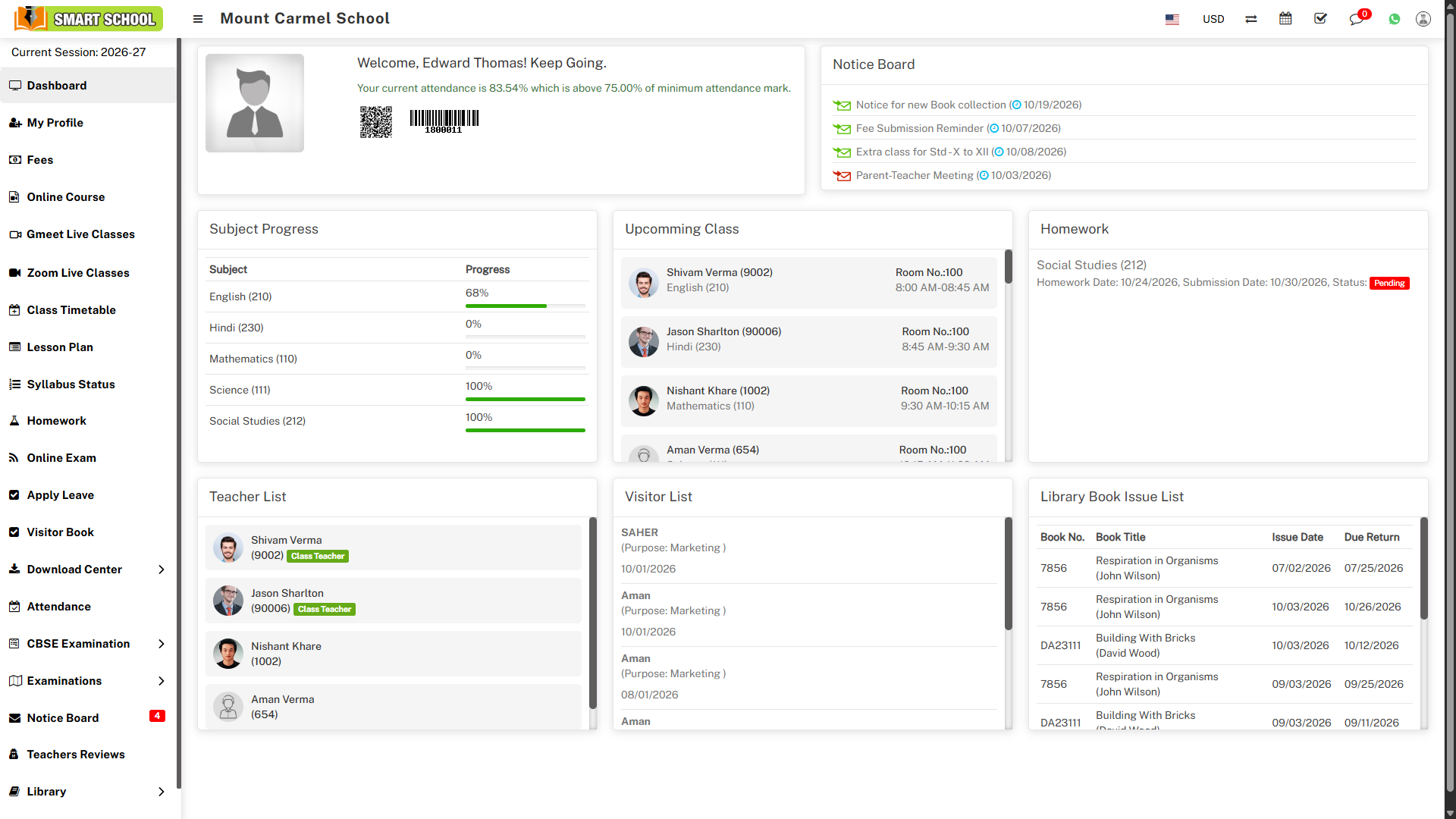
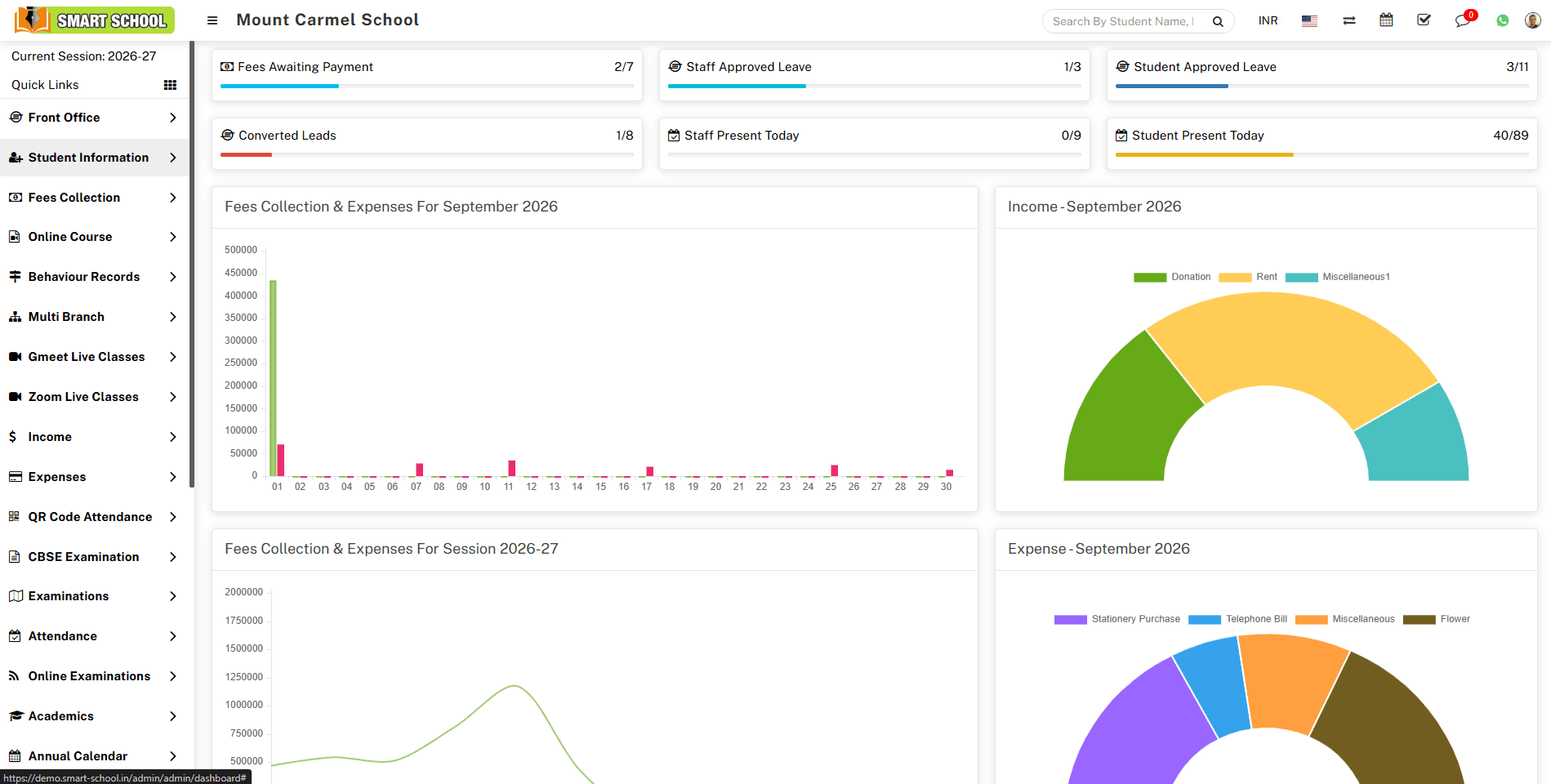
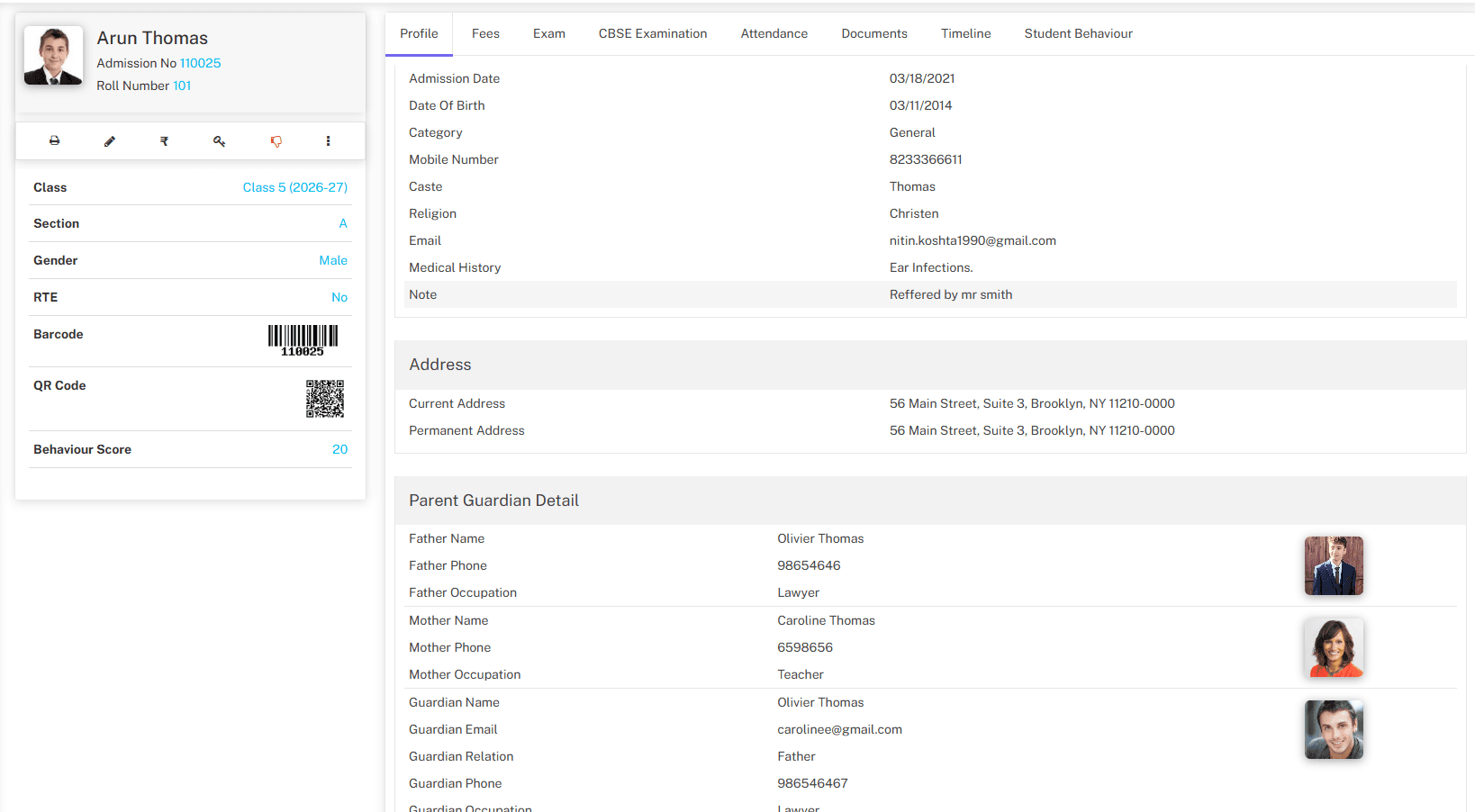
Take a look inside
The actual product, up close.
1 / 20⌕⊞⚙
How Smart School will automate your institution
From Smart School purchase to a fully running school.
Every step from buying a licence to running a real school day in Smart School: admissions, fees, attendance, exams and parent communication, with your whole staff working in one system.
45 steps9 phasesClick a step to see its screenshot
01/45Get started
Phase 01
Get started
Steps 01–06
STEP 012 minutes
Buy a licence
Choose the licence that fits your school, then pay online. Your licence key and invoice reach your inbox right away, and they also appear in your customer dashboard.
Instant licence key delivered by email
GST-ready invoice for your accounts team
One licence covers the whole school, with no per-student fees
STEP 021 minute
Download the latest release
Sign in to your customer dashboard and download the latest Smart School package through a secure, time-limited link. The newest stable version is always the one you get.
Secure download link that expires after use
Release notes shown next to every version
Re-download at any time from your dashboard
STEP 0310 minutes
Prepare your server
Run Smart School on shared cPanel hosting, a VPS, or a local XAMPP/WAMP machine for a LAN-only campus. Create an empty MySQL database and upload the files.
Works on cPanel, VPS, XAMPP, WAMP, NGINX and IIS
Standard PHP + MySQL stack, with no special hardware
LAN mode keeps your data inside the campus network
04
STEP 045 minutes
Run the installer
Open the installer in your browser, enter your database details, and create the Super Admin account. The installer builds all tables and default settings for you.
Guided browser-based installer with no command line
Database tables and defaults created automatically
Super Admin account created in the same step
05
STEP 051 minute
Activate your licence
Paste your licence key to activate the installation. From then on, activation also unlocks verified updates and new releases from your dashboard.
One-time activation tied to your domain
Unlocks automatic update notifications
Move to a new server later without buying again
06
STEP 065 minutes
Secure your login
Enable SSL and sign in as Super Admin. Turn on two-factor authentication so that only verified staff can reach the admin panel.
HTTPS for every page and every login
Two-factor authentication with Google Authenticator
Separate login pages for staff, students and parents
Phase 02
Configure your school
Steps 07–12
07
STEP 0710 minutes
Add your school profile
In System Settings, enter your school name, code, address, contact details, logo, currency, timezone and date format. These details appear on every receipt, report and certificate.
Branded receipts, ID cards and report cards
Multi-currency and multi-language support
Change any detail later without losing data
08
STEP 082 minutes
Set the academic session
Create the current session, for example 2026-27, and make it active. All attendance, fees and exam records then belong to that session, and past years stay searchable.
Clean year-on-year records
Switch sessions to view any past year
Promote students into the next session in bulk
09
STEP 0910 minutes
Connect SMS, email & WhatsApp
Add your SMS gateway, email service and WhatsApp (Meta or Twilio) credentials once. After that, fee reminders, absence alerts and notices go out automatically.
Popular Indian and international SMS gateways
WhatsApp messaging via Meta or Twilio
Full email / SMS delivery log
10
STEP 105 minutes
Enable online payments
Switch on the payment gateway your school uses. Parents can then pay fees from the parent panel or mobile app, and each payment reconciles against their ledger instantly.
Multiple payment gateways built in
Receipts generated and emailed automatically
No manual matching of bank statements
11
STEP 115 minutes
Turn on ID auto-generation
Set a prefix and starting number for admission numbers and staff IDs. Every new student and employee then gets a unique, consistent ID with no typing and no duplicates.
Custom prefixes such as ADM-2026-0001
Separate series for students and staff
Eliminates duplicate admission numbers
12
STEP 1210 minutes
Define roles & permissions
Use the built-in roles (Admin, Teacher, Accountant, Librarian and Receptionist) or create your own. Tick exactly which modules and actions each role can view, add, edit or delete.
8 ready-made roles, plus unlimited custom roles
Per-module view / add / edit / delete control
Teachers see only their assigned classes
Phase 03
Build your academic structure
Steps 13–17
13
STEP 1310 minutes
Create sections & classes
Add sections such as A, B and C, then create classes from Nursery to Class 12 and attach the right sections to each. This structure drives admissions, fees, attendance and exams.
Any number of classes and sections
One structure reused by every module
Edit anytime as your school grows
14
STEP 1410 minutes
Add subjects & subject groups
Create subjects with codes and mark each one as theory or practical. Group them per class, for example Science and Commerce streams, so each student has the correct subject list.
Theory and practical subjects
Subject groups for streams and electives
Used by timetable, exams and lesson plans
15
STEP 1515 minutes
Onboard your staff
Add departments and designations, then create a staff profile for each teacher and employee. Every staff member gets their own login, dashboard and role-based access.
Complete staff directory with documents
Personal login for every employee
Bulk import staff from a spreadsheet
16
STEP 165 minutes
Assign class teachers
Choose a class teacher for every class and section, and assign subject teachers. Each teacher's dashboard then shows only their own classes, students and daily tasks.
Clear accountability for every section
Restrict teachers to their own students' data
Reassign in seconds when staff change
17
STEP 1720 minutes
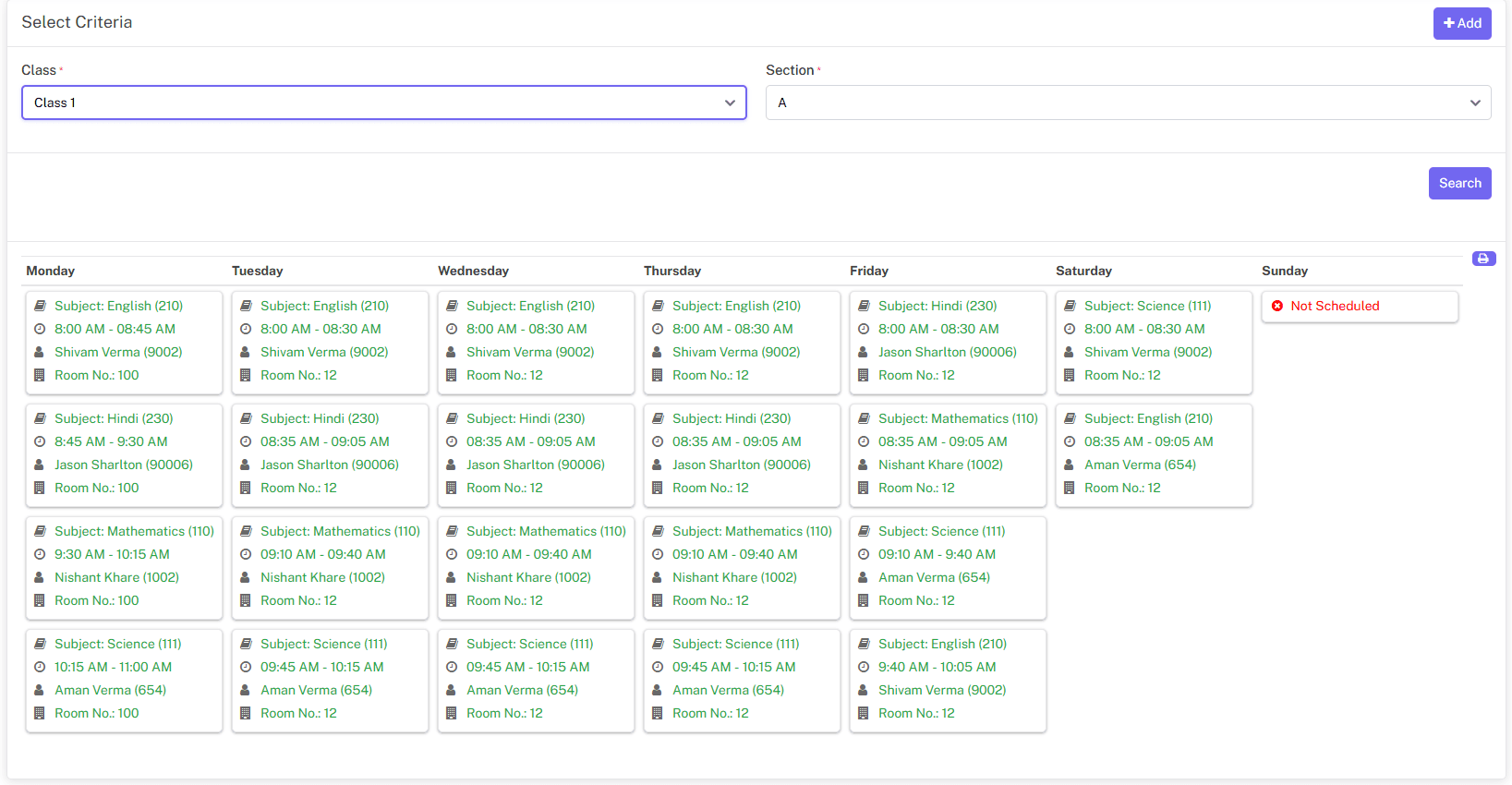
Build the class timetable
Set periods for each class and section with the subject, teacher, time and room. Teachers, students and parents all see the same live timetable in their own panels.
Period-wise timetable per section
Teacher-wise timetable generated automatically
Visible on web and mobile app
Phase 04
Admissions & student records
Steps 18–21
18
STEP 1810 minutes
Capture enquiries at the front office
Record admission enquiries, visitors, phone calls and postal mail at reception. Set follow-up dates so the front desk can turn more enquiries into confirmed admissions.
Admission enquiry with follow-up reminders
Visitor book and phone call log
Nothing gets lost on paper registers
19
STEP 1910 minutes
Open online admissions
Publish an online admission form on your school website. Parents apply from home and upload documents, you review each application, and approved students move straight into records.
Configurable online admission form
Review, approve or reject each application
Printable admission receipt for parents
20
STEP 202 min per student
Admit students
Fill in one admission form with the student's details, guardian, class, section, documents and photo, then assign fees in the same step. Student and parent logins are created automatically.
Bulk import existing students from Excel
Fees assigned during enrolment
Parent and student logins generated instantly
21
STEP 21Ongoing
Keep a 360° student profile
Every student's profile holds their attendance, fees, exam results, documents, behaviour records and timeline. Any authorised staff member can check a child's full history in one click.
Single source of truth per student
Sibling linking for combined parent access
Class and section reports on demand
Phase 05
Fees, income & expenses
Steps 22–27
22
STEP 2210 minutes
Create fees types
List every charge your school collects, such as admission, tuition, exam, library, sports and transport fees. Each type becomes a separate line on receipts and reports.
Unlimited fees types
Clear, itemised receipts for parents
Reusable across every session
23
STEP 2315 minutes
Build fees groups & fees master
Combine fees types into groups, for example "Class 5 Annual", then set amounts and due dates in the fees master. Monthly, quarterly and one-time schedules are all supported.
Installments with individual due dates
Automatic fine for late payment
Quick Fees Create sets up a full structure in one screen
24
STEP 245 minutes
Assign fees & discounts
Assign a fees group to a whole class, a section or individual students. Apply sibling, staff-child or merit discounts, and the balance is recalculated for every student.
Bulk assign to an entire class in one click
Named discounts with full audit trail
Transport and hostel fees added automatically
25
STEP 2530 sec a payment
Collect fees
Search the student, select the pending installments, and take cash, cheque, bank transfer or online payment. A numbered receipt prints instantly, and thermal printers are supported.
Partial payments and advance payments
A4 or thermal receipt printing
Online payment from parent panel and app
26
STEP 26Automatic
Send fees reminders
Schedule reminders before and after each due date. Parents get SMS, email or WhatsApp messages automatically, so your accounts team no longer has to phone every defaulter.
Before-due and after-due reminders
Sent by SMS, email and WhatsApp
Fewer overdue balances with no extra effort
27
STEP 27Daily
Track income, expenses & reports
Record non-fee income and daily expenses under your own heads. Fees statements, balance reports and collection summaries give the principal the full financial picture every day.
Daily collection and balance fees reports
Income and expense heads with search
Export any report to Excel, CSV or PDF
Phase 06
Daily classroom operations
Steps 28–33
28
STEP 282 min a day
Mark student attendance
Class teachers mark the whole section present, late, absent or half-day in one screen from web or mobile. Parents of absent students are notified automatically.
Whole-class attendance in under two minutes
Instant absence alerts to parents
Date-wise, monthly and yearly attendance reports
29
STEP 29Automatic
Go contactless with QR / biometric
Print a QR code or barcode on each student and staff ID card, or connect a biometric device. Attendance is recorded the moment someone checks in, including total hours.
QR / barcode scanning from any device
Biometric attendance app integration
In-time, out-time and total hours calculated
30
STEP 3015 min a week
Plan lessons & track syllabus
Break each subject into lessons and topics and assign them to dates. Teachers mark topics as complete, and the principal sees syllabus progress for every class in real time.
Lesson → topic → lesson plan structure
Syllabus completion status per subject
Spot lagging classes before exams
31
STEP 315 minutes
Assign homework
Post homework with a due date and attachments. Students submit online, teachers evaluate and mark it, and parents can see exactly what is pending.
Homework with file attachments
Online submission and evaluation
Homework evaluation and daily assignment reports
32
STEP 325 minutes
Run live online classes
Schedule Zoom or Google Meet classes from inside Smart School. Students join from their panel, and attendance for each live class is recorded automatically.
Zoom and Google Meet integration
Join from student and parent panels
Live class attendance reports
33
STEP 335 minutes
Share study material
Upload notes, assignments, syllabus files and video tutorials to the Download Center, and share them with a class, section or individual students in one step.
Content organised by type and class
Video tutorials for students
Track what was shared and with whom
Phase 07
Exams & results
Steps 34–36
34
STEP 3415 minutes
Set up exams & grading
Define your marks grades, create an exam group for each term, add exams, and attach subjects with dates, maximum marks and pass marks. CBSE-pattern terms and assessments are supported.
Grade and percentage based marking
Exam schedule visible to students and parents
CBSE examination add-on available
35
STEP 3510 min a subject
Enter marks & publish results
Subject teachers enter marks directly or import them. Ranks, grades and results are calculated automatically, and printed marksheets and admit cards are ready in minutes.
Automatic grade and rank calculation
Printable admit cards and marksheets
Results visible in the parent panel
36
STEP 3620 minutes
Conduct online exams
Build a question bank or import questions, then create timed online exams with automatic evaluation. Students take the exam from their panel, and results are available instantly.
Question bank with bulk import
Timed exams with auto evaluation
Ideal for weekly tests and practice
Phase 08
Staff, campus & communication
Steps 37–40
37
STEP 37Monthly
Manage HR, leave & payroll
Record staff attendance, approve leave requests online, and generate monthly payroll with payslips. Staff apply for leave from their own login, with no paper forms.
Leave types, requests and approvals
Staff attendance and payroll with payslips
Staff attendance reports for management
38
STEP 3815 minutes
Run transport, hostel & library
Create bus routes, vehicles and pickup points, allocate hostel rooms, and issue and return library books. Related fees are added automatically to each student's ledger.
Routes, vehicles and student route assignment
Hostel rooms, room types and reports
Library members, issue and return tracking
39
STEP 392 minutes
Communicate with everyone
Post notices to the notice board and send email, SMS or WhatsApp messages to a class, a role, or the whole school. Everyone gets the same message at the same moment.
Notice board for staff, students and parents
Group or individual SMS, email and WhatsApp
Built-in chat, calendar and to-do list
40
STEP 40Ongoing
Give parents a window into school
Parents and students log in on the web or the mobile app to see attendance, homework, timetable, results and fees due, and to pay online. They get fewer surprises and make fewer calls to the office.
Dedicated student and parent panels
Android mobile app for families
Online fee payment and downloadable receipts
Phase 09
Grow beyond the basics
Steps 41–45
41
STEP 4110 minutes
Issue certificates & ID cards
Design templates for student ID cards, staff ID cards, transfer certificates and bonafide certificates, then generate them in bulk for an entire class.
Custom certificate and ID card designs
Bulk generation per class or section
QR / barcode printed on ID cards
42
STEP 4210 minutes
Control stock with inventory
Track uniforms, stationery and lab items across stores and suppliers. Record purchases and issues so you always know what is in stock and who received it.
Item categories, stores and suppliers
Stock purchase and issue records
Inventory reports on demand
43
STEP 4320 minutes
Publish your school website
Use the built-in Front CMS to manage menus, pages, events, gallery and news. Your website stays connected to online admissions, so it keeps working as an admissions channel.
Menus, pages, events, news and gallery
Media manager for images and files
Linked to online admission form
44
STEP 44Year-end
Promote students & start a new year
At session end, promote passed students to the next class in bulk, move leavers to Alumni, and switch to the new session. Last year's records stay safely archived.
Bulk promotion per class and section
Alumni records and alumni events
Full history preserved for every year
45
STEP 45One click
Stay up to date
When a new Smart School version is released, your dashboard notifies you. Download the update and apply it without losing any data, settings or customisations.
Update notification in your dashboard
Data and settings preserved on update
New features added release after release
That’s the whole journey — you’re up and running.
Features
Twelve core modules, one school system.
Everything below ships in the box with your licence. Open any module to see what it covers. Hostel, inventory, alumni, income and expenses, reports and a built-in school website come in the same box.
Pricing
Plans that scale with you.
Prices shown in your local currency. Pick a license and a support term — add modules on the next step.
Every license type and support term side by side, with price and what each includes.
Compare every planOne-time price per license. Support and updates start on the day you buy.
Single Domain License
Multi Domains License
Extended License
Most Popular6 Months support$59per licenseStart Now
What schools usually ask us before they buy. If your question is not here, our team is a chat or a ticket away.
Choose by how many live installations you need. The Single Domain licence runs Smart School for one school on one domain. Multi Domains covers up to five installations, useful for a group of schools or an agency serving several clients. Extended allows unlimited installations within your organisation, including internal SaaS-style use. All three include the same modules.
It is a one-time payment. The licence never expires, and there is no yearly fee to keep the software running. The price includes 6 or 12 months of support, whichever you pick at checkout. You can renew support later only if you want continued help from our team.
No. One licence covers the whole school, with no per-student, per-teacher or per-login fees. Your installation can hold as many students, staff, parents and academic sessions as your server can handle.
Yes. Smart School runs in schools, colleges and institutes. Examinations offers school-based, college-based and GPA grading, classes and sections are fully yours to define, and every timetable, exam and fee structure is set up per class. A campus with several shifts usually sets them up as separate sections.
Yes. Staff log in with their own role, such as Admin, Teacher, Accountant, Receptionist or Librarian, and see only what that role allows. Students and parents get their own panels for attendance, fees, homework, timetables, results and notices. You can send login details to a whole class in one step.
Your installation keeps working exactly as before, with all data and settings. You keep receiving new versions, because product updates are included for the life of the licence. What ends is help by ticket from our team. Renew support from your dashboard whenever you need it again.
When a new version is released, your dashboard tells you and you download it from there. Updates are included for the life of the licence. Your data and settings are preserved. If you have edited the core code, keep a copy of your changes, because updated files replace the originals.
Support is by ticket from your customer dashboard, and we usually reply within one business day. It covers installation and activation problems, bugs, and how-to questions about any feature. Custom code changes and problems caused by your hosting or third-party software are outside its scope.
Immediately. Your licence key and invoice are emailed the moment the payment is confirmed. They also appear in your customer dashboard, where you can download the latest version, view your licences and manage your installations at any time.
Smart School runs on a standard PHP and MySQL stack, so most shared cPanel hosting, any VPS, or a cloud server will work. Linux with Apache is recommended for the best performance. Check the exact PHP and MySQL versions in the server requirements guide before you buy, or ask our team to check your hosting for you.
You do. Smart School runs on your own server, so student, fee and staff records never pass through ours. Every user gets only the permissions of their role, and the Two Factor Authentication add-on adds a code from Google Authenticator after the password. The built-in backup tool keeps a backup history and can run on a schedule.
Yes. You can install Smart School on a local XAMPP or WAMP machine and use it over your campus network. Installations on localhost or a private network address do not use up a licence activation, so you can also keep a test copy alongside your live system.
Installation is browser-based. Upload the files, create an empty MySQL database, open the installer, enter the database details and create your Super Admin account. No command line is needed. Step-by-step guides cover cPanel, XAMPP and WAMP. If you would rather not do it yourself, contact our team before or after purchase.
Yes, without buying again. Move your files and database, release the old domain from your customer dashboard, and activate the licence on the new domain. Your students, fees, exams and every other record move with the database.
Yes. Student records can be imported in bulk from a spreadsheet, and the Online Examinations question bank has its own import. Classes, sections, fee structures and staff are quick to set up in the admin panel. Talk to our team if you are moving from another school ERP.
Yes. Every licence includes the full source code, and you may customise, re-theme and white-label Smart School for your own installations. Custom fields, roles and permissions, email and SMS templates, certificate and ID card designs are all configurable without code. Changes you make to the core code are outside the scope of support.
Yes. Smart School is multi-language and multi-currency, so you can run the panels in the language your staff prefer and show fees in your own currency. Each user can switch the panel language for themselves.
Yes. A built-in front website comes with every licence, with pages, events, a gallery and notices that you manage from the admin panel. Families can apply for admission online from the website, and the applications land straight in Student Information.
Yes. The Smart School Mobile App for Android and iOS is sold separately as an extension and connects to your own installation, giving parents, students and staff the school on their phone. The web panels also work in any phone browser, so families are covered even without the app.
Yes. Parents pay from the student or parent panel, and the payment lands on the student's fee record with a receipt. Smart School has built-in settings for gateways including Razorpay, Paytm, PayU, CCAvenue, Instamojo, Stripe, PayPal, Paystack and Flutterwave. You connect your own merchant account, so the money goes straight to the school.
Yes. The Communicate module sends email and SMS to a class, a role or individual people, with templates, scheduling and a delivery log. Connect the SMS gateway and email service you already use. WhatsApp messaging through Meta or Twilio is available as an add-on.
Yes, with the Smart School Biometric Attendance App, sold separately as an extension. It is a Windows desktop app that brings punches from biometric devices into Smart School attendance, and it works with devices that run ZKTeco firmware with Push Data. Without hardware, the QR Code Attendance add-on lets students and staff scan their ID card with a phone, webcam or scanning gun.
Add-ons such as CBSE Examination, QR Code Attendance, Zoom and Google Meet live classes, Multi Branch and WhatsApp Messaging are licensed separately. Buy them with your licence or at any time later, and they install into your existing setup without affecting your data.
A Multi Domains licence lets you run up to five separate Smart School installations. The Multi Branch add-on connects installations so a group of schools can be managed from one Super Admin, with combined finance and payroll reports. A school group usually needs both: enough licences for each branch, plus Multi Branch to manage them together.
Yes. The live demo has one-click logins for every staff role plus a student and parent login, and you can book a guided demo with our team. Because the software is downloadable, sales are generally final. A refund is possible within 7 days if the licence has not been activated, or if a verified technical problem cannot be fixed. The Refund Policy has the full conditions.
Trusted by Running every day in1,240+ schools across India.
MaxManDPSSchool
Audience
Who Is This For?
Whether you're a developer, maker, founder, or growth marketer, Webfeb helps you ship faster.
We use cookies to keep the site running, understand how it is used, and (with your permission) personalise content. You can accept all, reject non-essential cookies, or choose which categories to allow.